Race conditions are common problems in web applications. The issue with race conditions is that they can be really hard for developers to debug and reproduce.
In this article, I will explain what race conditions are and how stored procedures in PL/SQL can mitigate them.
Race conditions
What are they, exactly?
A race condition can occur when two or more processes check the same condition and act on it simultaneously.
To better explain what a race condition is, we can use a customer loyalty program as an example. A business has a customer loyalty program that awards a ticket to a music concert to the first 20 customers who register their email for the new newsletter. Whenever a customer registers their email address, the web application checks whether fewer than 20 tickets have been awarded. If fewer than 20 tickets have been awarded, the customer will be given a concert ticket.
As an example, this logic can be performed in four steps.
- Get the number of given tickets, and the number of available tickets (SQL query)
- Check if the number of given tickets is less than the number of available tickets (app logic)
- Increase the number of given tickets by one. (SQL query)
- Send a congratulatory email to the customer (app logic)
This is fine whenever there are no concurrent registrations on the web app. The problem arises when a distributed system accesses the same database. For example, when using PHP-FPM or when several containers run instances of the same app. During campaigns like this, there is a high risk that several customers will try to register their email in hopes of receiving free tickets at the same time. A race condition occurs when two instances check at the same time, and 19 of the 20 available tickets have been awarded. Since one ticket is still available, both will award a ticket to the customer and send a congratulatory email. The problem is that 21 tickets have now been awarded, and the company only had 20 available.
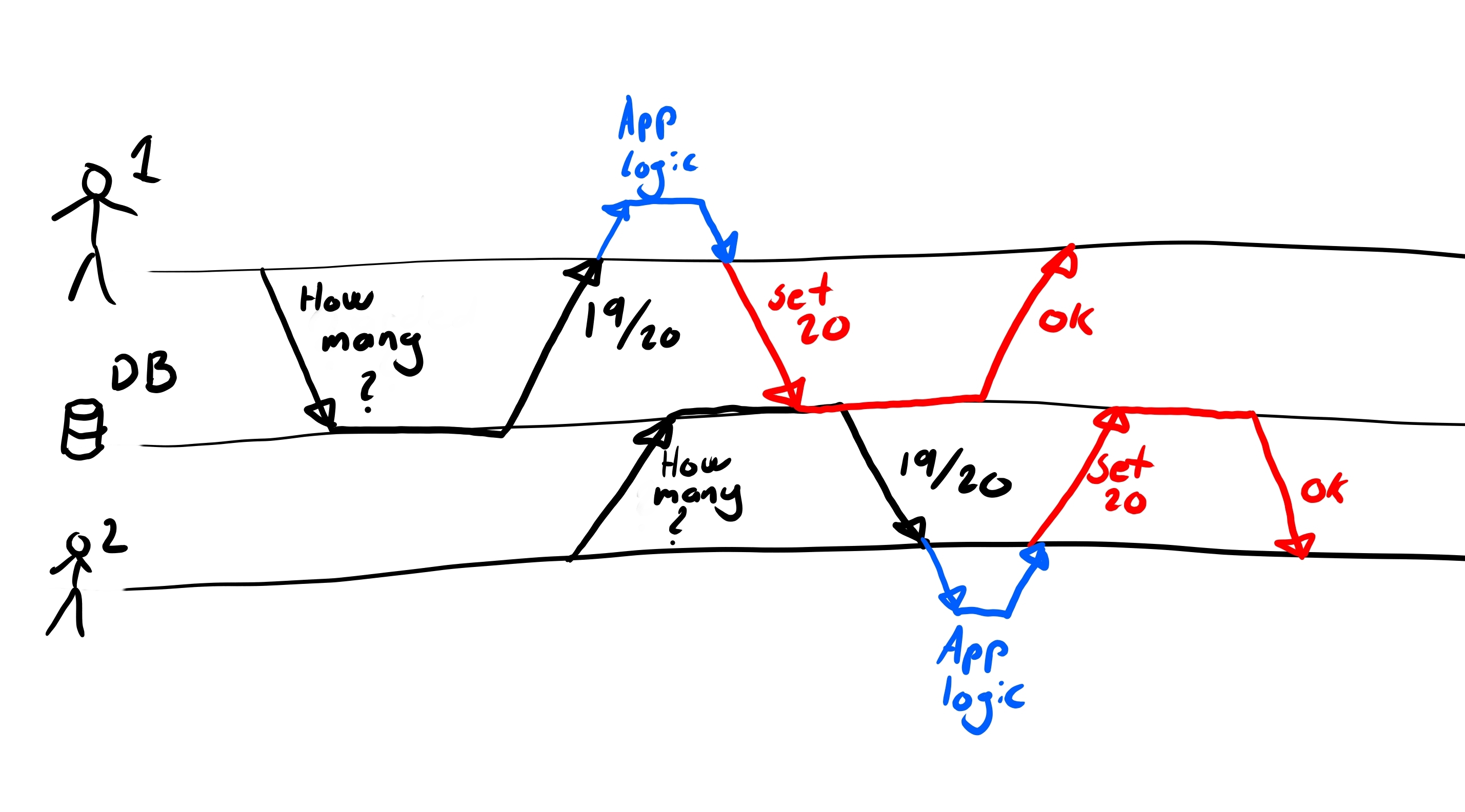
A race condition occurs when two processes make decisions on the same data.
Illustration by Stanley Skarshaug
The problem can occur earlier as well, for example, when three customers register at the same time. During step 2, all three app instances learn that only 8 tickets have been awarded. Since there are available tickets, each sends a SQL query to the database, setting the number of available tickets to 9 (step 3). Now, 11 tickets have been awarded to customers, but the database shows only 9.
PL/SQL procecure
Stored procedures to the rescue!
The beauty of PL/SQL and other approaches to stored procedures is that you can execute database logic within a single transaction. Meaning that you will not perform two queries to the database, but instead just one query.
CREATE OR REPLACE PROCEDURE add_ticket (
    v_campaign_id IN campaigns.id%type
)
IS
    v_awarded_tickets campaigns.awarded_tickets%type;
    v_max_tickets campaigns.max_tickets%type;
    e_ticket_limit_exceeded EXCEPTION;
BEGIN
    -- Check the current number of tickets for the campaign
    SELECT
        awarded_tickets,
        max_tickets
    INTO v_awarded_tickets, v_max_tickets
    FROM campaigns
    WHERE id = v_campaign_id;

    -- If adding the new tickets exceeds the limit, raise an error
    IF v_awarded_tickets + 1 > v_max_tickets THEN
        RAISE e_ticket_limit_exceeded;
    END IF;

    -- Otherwise, update the awarded tickets count
    UPDATE campaigns
    SET awarded_tickets = awarded_tickets + 1
    WHERE id = v_campaign_id;

    Commit;
EXCEPTION
    WHEN e_ticket_limit_exceeded THEN
        DBMS_OUTPUT.PUT_LINE('Error: Cannot add more tickets.');
END add_ticket;
This PL/SQL procedure will only increase the awarded tickets if there are available tickets. Since everything happens within a single transaction, there is no risk of a race condition.
Thank you for reading! I hope this article made you appreciate the power of stored procedures. 🎉